
(Skip this paragraph if you’ve shipped a Stream Deck plugin before. The Stream Deck is Elgato’s USB grid of programmable LCD keys — common on streamer desks for scene switching. A “plugin” is a small program — TypeScript, in my case — that runs as a child process of Elgato’s Stream Deck app, registers one or more actions the user can drag onto keys, and reacts to events like “key pressed” or “key visible.” The SDK is @elgato/streamdeck from npm. A manifest is a manifest.json next to the plugin that declares its actions, supported devices, default icons, and per-state defaults like title alignment.)
I built a Stream Deck plugin in TypeScript using the official @elgato/streamdeck SDK. Most of it is pleasant — register actions in manifest.json, implement onWillAppear (the lifecycle event the SDK fires when a key with your action attached becomes visible on the device) / onKeyDown, call setTitle() and setImage(), ship. Then I hit two cases where the device or the app lies about its state, and I spent a weekend staring at a deck of mysteriously-wrong buttons.
This is the post I wish I’d found in week one.
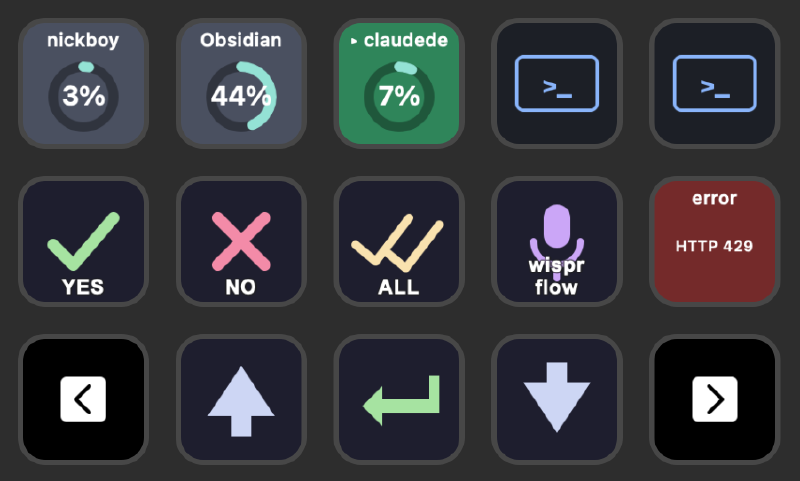
The keys above are the result of fixing both quirks: the session slots in row 1 each render as a single SVG (donut, percentage, name baked together — Quirk 1’s workaround), and the page-navigation arrows in row 3 use the SDK’s built-in actions wired up by a generated profile (Quirk 2’s territory).
Quirk 1: TitleAlignment is per-key cached, not manifest-driven #
My session-slot keys needed three text layers stacked vertically: session name at the top, a context-usage donut in the middle, a percentage centered inside the donut. The obvious split: title for the top text, SVG image for the rest.
The SDK’s manifest lets you control title alignment, font size, and colour per action state:
{
  "UUID": "com.nickboy.claudedeck.sessionSlot",
  "Name": "Session Slot",
  "States": [{ "TitleAlignment": "top", "FontSize": 10, "ShowTitle": true }]
}
Works fine the first time you drag the action onto a key. Now bump FontSize: 10 to FontSize: 9 because 10 turned out cramped, reload the plugin, and watch nothing change. Existing keys hold whatever values they had the first time the action was placed. The Stream Deck app caches per-key title settings; subsequent manifest reloads don’t override that cache. The manifest only seeds the initial values for new placements.
You can see this directly in the app’s per-key UI. The dropdowns for alignment, font size, and colour show whatever was last written to that key — not whatever the manifest says today. There’s no “reset from manifest” button.
What didn’t work #
First instinct: hardcode the title position by sending setTitle with leading or trailing newlines to shove the text up or down. The title is rendered by the device firmware, not the SDK. Newlines render as literal blank lines, but the firmware still vertically centres the whole block — blank lines included — inside the title region. You can’t push it to the top without trashing the layout.
Second instinct: ask every user to fix their key settings by hand. Friction-y, brittle, hard to document, hard to keep in sync when the layout evolves.
What works: stop using titles #
The fix is to render the entire key as an SVG via setImage() and set setTitle("") so the title region is empty. Nothing depends on the cached alignment any more. The SDK passes the SVG bytes through to the device firmware as a 72×72 image; the firmware blits it pixel-for-pixel (“blit” being the old graphics term for “copy this rectangle of pixels straight to the framebuffer without scaling or transforming it”).
The shape of the renderer (full code in plugin/src/actions/sessionSlot.ts):
function renderSessionSlotImage(state: SessionState): string {
  const { backgroundHex, displayName, contextFillPercent, contextFillColor } = state;
  const nameOverlay = displayName
    ? `<text x="36" y="14" font-family="-apple-system, sans-serif" font-size="11"
        font-weight="600" fill="#fff" text-anchor="middle">${escape(displayName)}</text>`
    : "";
  const donut = renderDonut(contextFillPercent, contextFillColor);
  const svg =
    `<svg xmlns="http://www.w3.org/2000/svg" viewBox="0 0 72 72">` +
    `<rect width="72" height="72" fill="${backgroundHex}"/>` +
    `${donut}${nameOverlay}</svg>`;
  return `data:image/svg+xml;utf8,${encodeURIComponent(svg)}`;
}

// In onWillAppear / state update:
await ev.action.setImage(renderSessionSlotImage(state));
await ev.action.setTitle("");  // empty so it doesn't compete with the image
One subtlety: data:image/svg+xml;utf8, with encodeURIComponent is smaller and faster than base64 for SVG payloads, and the Stream Deck SDK accepts both. (A data URI is a URL that inlines the resource into itself — data:<mime>;<encoding>,<bytes> — instead of pointing at a file or HTTP endpoint. Base64 encodes binary into ASCII at +33% size; URL-encoded SVG keeps most characters as-is and only escapes the ones URLs can’t contain.) I default to URL-encoded.
The bonus prize is full typographic control. The native title path gives you one font, one size, one colour per state. Inside an SVG you mix sizes, weights, colours, and arbitrary shapes. The donut, the percentage, and the session name all live in one image — no fighting the title region, no per-key cache to drift.
I now do this for every action that needs any layout sophistication: session slots, Plan Usage, the arrow keys with offline-indicator dots. The native title path is reserved for the simplest actions (a placeholder that just shows bridge state, where the manifest defaults are fine forever).
Quirk 2: willAppear doesn’t always re-fire after a plugin restart #
The Stream Deck SDK fires willAppear when a key becomes visible. You’d think “becomes visible after a plugin restart” counts. It usually does. Not always.
I run streamdeck restart com.nickboy.claudedeck (the Elgato CLI’s “kill and re-spawn my plugin” command, keyed by my plugin’s reverse-DNS UUID) constantly during development. Sometimes after the restart, my plugin’s action map is empty — zero willAppear events arrived. The keys still show their last-rendered image (the firmware caches it), but the plugin has no handle to push updates. The keys are still live — pressing them fires keyDown correctly. Only willAppear is missing.
Symptom in my plugin log:
[plugin] bridge connected
[plugin] action count: 0
[plugin] handling permission:pending → no action found, skipping
The Stream Deck app’s per-plugin state console (the gear-icon panel) confirms visible=0 for the plugin, even when the ClaudeDeck profile is currently displayed and the keys are right there on the device.
The workaround #
Toggling the profile off and back on forces the SDK to re-fire willAppear for every visible key. My dev loop:
streamdeck restart com.nickboy.claudedeck.- Stream Deck app → profile dropdown → switch to any other profile, then back to ClaudeDeck.
- Plugin log:
action count: 15. Done.
Annoying. The plugin-internal half of the mitigation: on a daemon:ready WebSocket message (which the plugin receives on every reconnect to my daemon), I clear the session-slot manager so stale slots from a previous daemon process don’t linger. That handles the state-side refresh. The device-visible image refresh still needs the manual toggle.
What I’d like instead #
A “force re-emit willAppear for everything visible” RPC. Or an idempotent getVisibleActions() query so I can rebuild the action map without waiting for events. Or — best — just consistently firing willAppear on plugin restart.
This is Stream Deck app behaviour, not plugin behaviour. The SDK passes through whatever the app decides to emit. So the fix is either upstream or a workaround on my side. The cheapest workaround is documentation: a README note telling users to toggle the profile if updates aren’t landing after a plugin restart.
A third quirk worth mentioning: profiles ship as files, with a UUID gotcha #
If your plugin needs more than three or four actions, you don’t want users dragging them onto keys by hand. You ship a pre-arranged .streamDeckProfile directory tree inside the .sdPlugin bundle (the directory that is your plugin — manifest.json + binary + assets, all named with the Elgato-mandated .sdPlugin suffix). The Stream Deck app picks it up when the plugin installs.
The profile is a directory, not a zip — and its layout is more involved than the obvious shape. From plugin/scripts/generateProfile.ts, the shape that actually imports on Stream Deck app 6.x:
<outerUuid>.sdProfile/
├── manifest.json          ← Version: "3.0", AppIdentifier, Pages.Current
└── Profiles/
    └── <PAGE-UUID-UPPERCASE>/
        └── manifest.json  ← Controllers, Actions
Two distinct UUIDs. The outer one names the wrapper directory. The inner page UUID names the directory under Profiles/ and is referenced (lowercased) by Pages.Current in the outer manifest. The inner directory name is uppercased; the reference is lowercased. Mess up either and the app refuses to import.
The grid coordinates inside the inner manifest.json ("0,0", "col,row") place each action. My layout for a 15-key MK.2:
- Row 0: 5 session slots.
- Row 1: YES / NO / ALWAYS permission keys + Wispr Flow trigger + Plan Usage.
- Row 2: page-prev, arrow up, enter, arrow down, page-next.
The page-prev and page-next keys use system actions rather than my own: com.elgato.streamdeck.page.previous and com.elgato.streamdeck.page.next. They live inside the Stream Deck app and you drop them into your profile manifest just like your own UUIDs. I confirmed these IDs by inspecting my existing profile under ~/Library/Application Support/com.elgato.StreamDeck/ProfilesV2/ — Elgato doesn’t appear to publish a system-action UUID reference, but the IDs are stable across app versions on my machine.
The UUID gotcha: both the outer and the page UUID must be real UUID-v4s (the 128-bit random-bytes flavour of universally-unique identifier — what you get out of uuidgen on macOS or crypto.randomUUID() in JS). The Stream Deck app uses them as keys in its profile registry. Reuse the same UUID across plugin versions and the app refuses to import the new profile because it thinks one already exists. My build script generates fresh UUIDs on every run and zips the result into a .streamDeckProfile. The Makefile target wires it into make plugin so every build produces a fresh profile.
Lessons #
- For any non-trivial key layout, render the whole key as an SVG via
setImage()and callsetTitle(""). The per-key title cache will outlive your manifest changes; SVG won’t. - If
willAppeardoesn’t fire after a plugin restart, toggle the profile. It’s an app-side state-machine quirk, not your code. - Treat the manifest as a one-shot seed, not a config file. Settings the user can edit in the per-key UI override the manifest forever after.
- Ship a
.streamDeckProfileif your plugin has more than three actions. Nobody drags 15 actions onto 15 keys for fun. - Use Elgato’s built-in system actions for page nav, brightness, multi-action. Reimplementing them is wasted work, and the IDs (e.g.
com.elgato.streamdeck.page.previous) drop straight into your profile manifest. - Generate fresh UUIDs on every build. The app’s profile registry keys on them; reused UUIDs silently block imports.
Building Stream Deck plugins is mostly pleasant. The two quirks above ate the most time of anything in the project, and both have one-line workarounds once you know what’s happening. Hope this saves the next person the dig.
References #
- Stream Deck SDK getting-started docs: https://docs.elgato.com/streamdeck/sdk/introduction/getting-started/
- Stream Deck SDK manifest reference (the source of truth for
TitleAlignment,FontSize,ShowTitle, actionStates): https://docs.elgato.com/streamdeck/sdk/references/manifest/ - ClaudeDeck session-slot renderer (full SVG-via-
setImageimplementation):plugin/src/actions/sessionSlot.ts - ClaudeDeck profile generator (
.streamDeckProfilelayout, UUID handling):plugin/scripts/generateProfile.ts - The “render the whole key as SVG via
setImage” pattern: I picked this up from inspecting other open-source Stream Deck plugins where the manifest setsShowTitle: falseand the action emits image data on every redraw. The Elgato manifest reference linked above documents theShowTitleoption that makes this configuration possible. - The
com.elgato.streamdeck.page.previousandcom.elgato.streamdeck.page.nextsystem-action UUIDs: I did not find these documented publicly. I confirmed them by inspecting profiles exported from the Stream Deck app and by reading profiles stored under~/Library/Application Support/com.elgato.StreamDeck/ProfilesV2/on my machine.